A Hikvision camera with no power usually isn’t a broken camera. When a “Hikvision camera no power” call comes in, the camera itself is rarely the cause. The path that feeds it usually is: the recorder’s PoE ports, a switch, the cable, or a connector that’s been sitting in the rain. Reboot loops tend to be the same problem at an earlier stage: the camera gets enough power to start and not enough to stay on. Swap the camera first and you can spend a few hundred dollars and still have the fault.
We install and repair Hikvision systems across Toronto and the GTA, and this guide follows the order our technicians use on site. It starts with a quick test that tells you which side of the cable the problem is on, then works through each link in the power chain.
What this guide covers, and what it doesn’t
Covered here: a camera that gets no power at all, or keeps losing power and restarting, on a PoE (Power over Ethernet) system.
Not covered: routine or scheduled restarts, firmware-triggered reboots and long-term maintenance are in our guide to how often security cameras reset. Keeping the whole system running through a blackout is covered in our UPS backup guide.
Different fault: if the camera’s infrared glows or its light is on but it won’t show up on the recorder, it has power. That’s a connection problem, not a power one.
Is It the Camera or the Power? A Five-Minute Test
Do these in order. Each step either clears the camera or points to a specific part of the power path.
- Look at the port. Most PoE recorders and switches have a light for each port. No light at all usually means no power is being delivered, or the port has been switched off.
- Make it dark. Cover the lens with your hand or a box for a few seconds. A click, a faint red glow from the infrared LEDs (your phone camera will show it) or, on colour-night models such as ColorVu, the white light switching on means the camera is alive and powered.
- Bench test it. Plug the camera into a different port with a short patch cable you know works, ideally right at the recorder. Starts there? Then the camera is fine.
- Try a plain power adapter. Many Hikvision cameras also accept 12 V DC. Runs on the adapter but not on PoE? Then the PoE path, or the camera’s own PoE circuit, is the problem.
| What you found | What it points to |
|---|---|
| Camera works on a short cable at another port | The original port, the cable run or the power budget |
| Works on a 12 V adapter but not on any PoE port | Camera’s PoE circuit, or a standard mismatch (see the switch section) |
| Starts, then drops after a few minutes or at dusk | Not enough power headroom on that port |
| Nothing on any port, cable or adapter | Likely a camera fault: check warranty before replacing |
Hikvision Camera No Power on the NVR’s PoE Ports
A recorder with built-in PoE ports looks like eight separate power outlets, but it isn’t. All the ports draw from one shared power budget, and when it runs out, cameras either refuse to start or drop off.
Here’s a real example. Hikvision’s DS-7608NXI-K2/8P, a common 8-port recorder, has an 80 W total PoE budget. A small 4 MP ColorVu bullet like the DS-2CD2047G2-LU uses at most 7.5 W, so eight of those fit comfortably. Swap one of them for a PTZ such as the DS-2DE4425IW-DE, rated at up to 18 W, and the recorder is running at about 70 W of its 80 W on paper, before any loss in the cables. That leaves very little room on a cold night, and the camera that drops out isn’t necessarily the new one.
Retail kits work the same way. A Lorex PoE NVR kit is matched to the cameras in the box, so adding a larger or extra camera later is a common reason one channel goes dark. Before you choose ports for a new camera, add up each camera’s maximum draw from its datasheet. It’s the same check that belongs in the planning stage of any residential security camera installation.
Check the long-distance setting
One camera on a long run won’t come up while the rest are fine? Check the PoE port mode. On current Hikvision NVRs it’s under Camera > Camera > PoE Settings. Ports ship in Short Distance mode, for runs under 100 metres. Long Distance mode supports runs of roughly 100 to 300 metres, with two catches: the camera’s stream has to stay within about 6 MP worth of bandwidth, and Hikvision calls for Cat6 cable beyond 250 metres.
PoE Switch Not Powering the Camera
When the cameras run through a separate switch instead of the recorder, a few extra things can go wrong. These are the ones we see most:
- Standard mismatch. Two IEEE standards matter here. 802.3af supplies up to 15.4 W per port (about 12.95 W reaches the camera); 802.3at, often sold as PoE+, supplies up to 30 W (about 25.5 W at the camera). A camera that needs PoE+ won’t start, or will keep restarting, on an af-only port.
- Passive injectors. Cheap passive PoE injectors push power down the cable without checking what’s connected. Standard 802.3 equipment checks the device first, so mixing the two can leave the camera unpowered or damage equipment that wasn’t built for it.
- Port turned off. On a managed switch, PoE can be disabled per port. On Hikvision switches, check PoE Management, where each port’s status and output power are listed.
- Non-standard cameras. Hikvision switches offer a PD Compatibility Mode for devices that don’t follow the standard closely. It can fix a camera that’s never detected, but Hikvision notes it reduces detection sensitivity, so use it only on the port that needs it.
PoE Voltage Drop: When a Camera at the End of a Long Run Won’t Start
Passed the bench test but fails on its own cable? Then the run is the suspect. Voltage drops along every cable, and a long or poor one can leave too little at the camera to start it, especially when it’s working hardest.
- Copper-clad aluminum (CCA) cable. It looks like Cat5e or Cat6 and costs less, but it has more resistance than solid copper and isn’t recognized by the cabling standards. Long CCA runs are a classic cause of cameras that won’t stay up.
- Bad terminations. A loose or badly crimped connector adds resistance at one point. Re-terminating both ends fixes more no-power calls than you’d expect.
- Corroded outdoor connectors. An RJ45 plug left in an open junction box picks up moisture, and in the GTA, road-salt spray too. Green or dull pins mean it needs replacing and sealing.
- Runs past 100 metres. Standard PoE is specified for 100 metres. Beyond that you need the recorder’s long-distance mode, a PoE extender, or a closer switch.
Long runs are where these show up: parking lots, warehouse yards and detached garages. That’s why solid copper Cat6 and sealed outdoor terminations are worth specifying from the start on any commercial security camera installation with long exterior runs.
PoE Camera Keeps Rebooting at Night or in the Cold
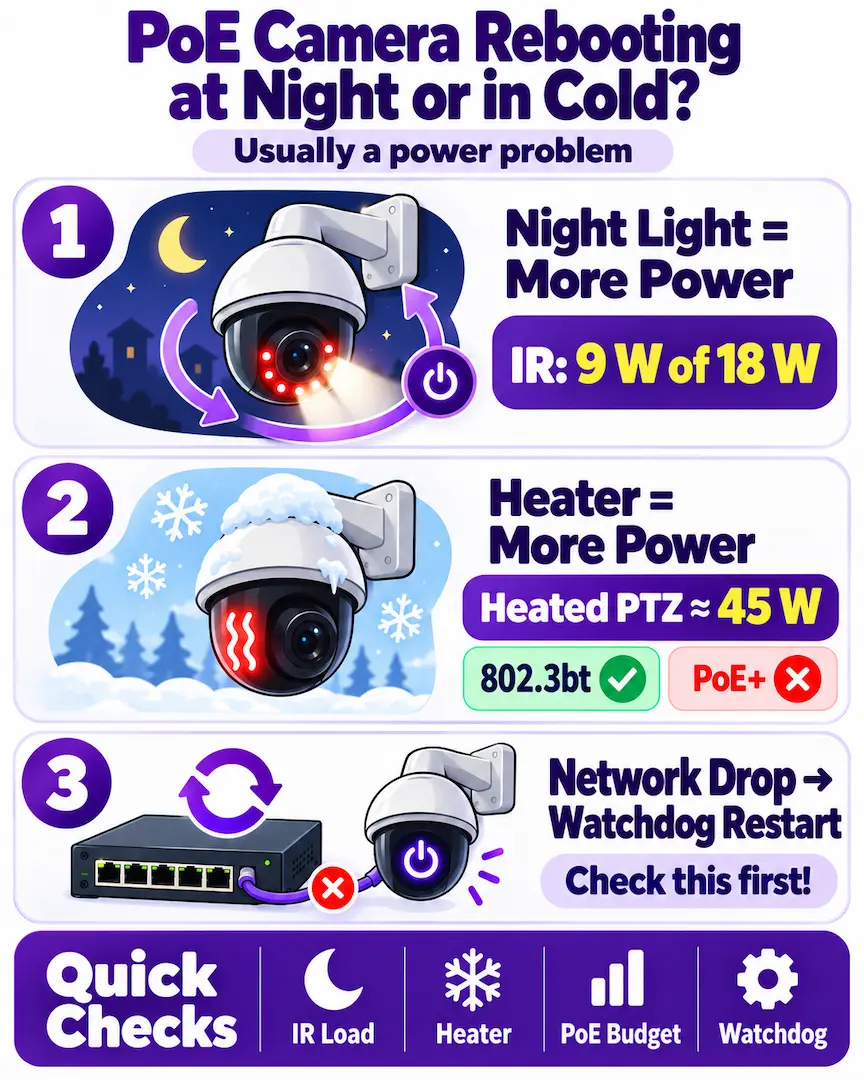
Online guides rarely cover this pattern, but we see it all the time. Picture a camera that works all day and starts cycling at dusk. It usually isn’t faulty. When the infrared or white light switches on, the camera’s draw climbs toward the maximum on its datasheet. On the PTZ above, the infrared alone accounts for 9 W of its 18 W. When the port, the recorder’s budget or the cable was only just coping during the day, that extra load tips it over. The camera browns out, restarts, switches night mode on again and repeats until morning.
Cold makes it worse. Cameras with built-in heaters switch them on as the temperature falls, and on the coldest mornings every heated camera on a switch can draw at once. A heated PTZ can need around 45 W, which means an 802.3bt port; on a PoE+ port it may run without heat or brown out when the heater kicks in. Our guide to security cameras in Canadian winter covers the other cold-weather failures.
One more cause that looks like a power fault but isn’t: Hikvision PoE switches have a PoE Watchdog that restarts any camera that stops responding. If a network problem makes a camera go quiet, the switch cuts and restores its power, which looks exactly like a reboot loop. Check whether the watchdog is on before chasing the power supply.
Security Camera Keeps Restarting? Rule Out the Recorder
Look at how many cameras drop at once. One camera cycling on its own points to its port, cable or power draw. When every camera goes dark together and then comes back, the recorder itself is probably restarting. That has its own causes:
- A weak or wrong power adapter on the recorder, especially after a replacement.
- A failing hard drive, which can freeze the system or pull more power than it should.
- Heat: a dusty or dead fan, or a recorder shut inside a cabinet with no airflow.
- A scheduled auto-reboot left switched on in the recorder’s maintenance settings.
When to Call a Technician
Some of these faults are a ten-minute fix. Others need test gear or a ladder. With a cable tester and a PoE meter, a technician can see what actually reaches the camera instead of guessing. Our security camera installation team handles these, and it’s time to call when:
- The camera passes the bench test, but nothing you change at the recorder end fixes it on its own cable.
- Several cameras on one recorder or switch drop at night or in cold weather.
- A run is longer than 100 metres, or uses cable you can’t identify.
- Connectors are outdoors and showing corrosion, or the cable is buried or inside a wall.
If the camera turns out to be dead and it’s still under warranty, Hikvision claims now go through your installer or distributor. Our guide to Hikvision support in Canada explains how that process works.
Camera Still Dark? We’ll Trace the Fault
Worked through the test and the camera still won’t stay on? We can trace the fault from the recorder to the lens in one visit. We measure what’s reaching the camera and fix the link that’s failing instead of guessing. We cover Toronto, North York, Markham, Vaughan, Mississauga and the rest of the GTA. Book a service visit or call us.