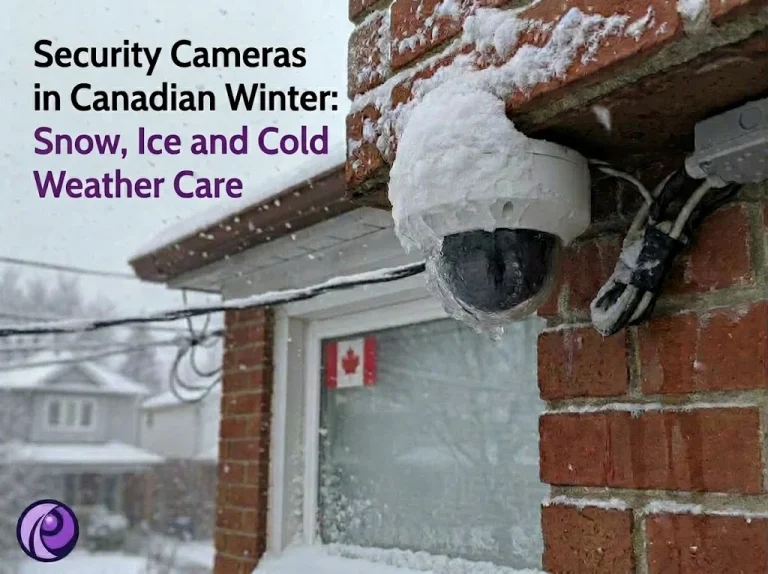
The cold itself is rarely what takes a camera down in a Toronto winter. January in the city averages about -5.5°C, and days below -20°C come around only two or three times a year, well inside what a decent outdoor camera is built for. What causes the missed footage is everything that comes with the cold: snow on a security camera lens after an overnight storm, a glaze of freezing rain, water creeping into a connector and then freezing, or a battery that quietly stops charging in December.
Whether you run two cameras on a house in Etobicoke or a dozen on a plaza in Scarborough, the fixes are mostly the same, and most of them are decided at the time of security camera installation, not in the middle of a storm. Below we cover which parts of a system actually struggle in the cold, how to keep snow off, how to deal with ice safely, how to protect cameras and cabling from winter weather, and a short checklist to run before the first snowfall.
Security Camera Not Working in the Cold? What Actually Fails
Different parts of a camera system have very different limits, so it helps to know where the weak points are before blaming the weather. The figures below come from current manufacturer specifications and are typical of each type.
| Component | Typical cold rating | What happens in a GTA winter |
|---|---|---|
| Wired IP camera (PoE) | Around -30°C (for example, a current Hikvision 4 MP dome) | Usually fine. The electronics give off some heat, and Toronto rarely approaches the rating. |
| Camera with a built-in heater | Down to -40°C, including cold start-up (for example, Axis models with Arctic Temperature Control) | Handles deep cold, but the heater needs more power, often a PoE+ (802.3at) port instead of standard PoE. |
| Battery or solar camera | Runs to about -20°C, stops charging below 0°C (Ring and Google Nest guidance) | The most common winter failure. Batteries drain faster and will not recharge outdoors until it warms up. |
| NVR (recorder) | Around -10°C to +55°C on a typical unit | Built for indoor use. An unheated garage or shed can push it out of range on the coldest nights. |
In practice, a wired camera that drops out during a cold snap is usually pointing at something other than the camera: a PoE switch that cannot supply enough power once heaters switch on, a long cable run at the edge of its power budget, or water that got into a connection during a thaw and froze. Battery cameras are a different story. If you rely on them for an entrance you care about, our comparison of wired or wireless security cameras explains why a hardwired camera is the safer choice for a Canadian winter.
How to Keep Snow Off Security Cameras
Snow becomes a problem when it lands on the lens or piles up in front of the camera, and both are mostly about where and how the camera is mounted. These are the placement choices that make the biggest difference.
- Mount under an overhang. A soffit or eave keeps falling snow off the lens. Stay clear of the roof edge itself, though, where meltwater drips and icicles form.
- Use a sunshield or hood. Many bullet cameras come with an adjustable shield that extends past the lens. Slide it fully forward for winter.
- Angle the camera down. A lens tilted toward the ground collects far less snow than one pointing straight out, and it usually gives a better view of faces anyway.
- Plan for snowbanks. Low cameras on parking lots, driveways and loading areas can disappear behind plough piles. Mount high enough to see over a winter snowbank, typically 2.5 to 3 metres.
- Keep salt spray in mind. Cameras close to a busy driveway or a garage ramp get coated in road salt slush. Mounting higher and further back keeps the housing and lens cleaner.
If a camera is already in the wrong spot, relocating it a metre or two under an overhang often solves a problem that would otherwise come back every storm.
Falling Snow and False Motion Alerts
At night, snow can cause a different problem. A camera’s built-in infrared light reflects off snowflakes falling close to the lens, so each flake shows up as a bright moving spot. Older motion detection treats that as movement, and your phone fills with alerts during every storm. Three changes help:
- Switch the camera to person and vehicle detection (AcuSense on Hikvision, SMD or WizSense on Dahua), which ignores most weather movement.
- Lower motion sensitivity or narrow the detection area during heavy snow, then set it back afterwards.
- On problem cameras, add a separate light or infrared illuminator mounted away from the camera, so the light no longer bounces straight back into the lens.
Security Camera Ice Buildup: How to Clear It Safely
Freezing rain is the GTA’s most awkward winter weather for cameras. It leaves a clear glaze over domes and lenses that blurs the image, and Toronto still averages a few days a year with freezing rain potential. The instinct is to scrape it off, but most quick fixes do more harm than the ice does.
| Do | Avoid |
|---|---|
| Brush loose snow off with a soft brush or cloth | Scraping ice with a scraper or knife, which scratches domes and lens covers |
| Give a thin glaze time to clear as the day warms up | Pouring hot water on the camera, which can crack cold glass and push water into seals |
| Use gentle warm air from a distance if the view is urgent | De-icer sprays, salt or windshield fluid on the lens, which leave a film |
| Wait for safe footing before using a ladder | Climbing a ladder on ice or snow to reach a camera |
If the same camera ices up after every storm, the cause is usually location. A camera under a dripping gutter or an ice dam will keep glazing over until it is moved.
How to Protect Security Cameras from Weather in Winter
Most outdoor cameras are sealed well enough for snow and rain. The weak points are the places where the system meets the outside: cable connections, entry holes and the housing whenever it is opened. Winter puts extra stress on all three because water gets in during a thaw, then expands when it freezes again.
- Seal every outdoor connection. Use the waterproof cap supplied for the network plug, or terminate inside a weatherproof junction box. Bare RJ45 connections taped up outdoors are a common cause of winter dropouts.
- Add a drip loop. Let the cable dip below the entry point before it goes into the wall, so water runs off the low point instead of following the cable inside.
- Seal wall penetrations. Fill around the cable with outdoor-rated sealant so meltwater does not reach the wall cavity.
- Use outdoor-rated cable. Indoor cable jackets can stiffen and crack in the cold, letting moisture in along the run.
- Do not open housings outdoors in winter. Humid air trapped inside turns to fog on the lens. If a camera has to come indoors for work, seal it in a plastic bag first so condensation forms on the bag, not inside the camera.
A camera’s IP and IK ratings tell you how well it resists water, dust and impact. For outdoor winter use, look for IP66 or IP67 on any camera you buy.
Winter Security Camera Maintenance: A Pre-Season Checklist
Half an hour in October or early November catches most winter problems while the weather is still easy to work in. Run through these checks once a year before the first snowfall.
- Check that every mount and bracket is tight. Snow load and wind loosen brackets over time.
- Clean lenses and domes with a soft microfibre cloth, then check the night view for haze or spider webs.
- Inspect cable jackets, connector caps and wall seals for cracks or gaps.
- Trim branches near camera views. Branches weighed down with ice sag into frame and trigger motion alerts.
- Confirm every camera is recording and that you can play back footage from several days ago.
- Check the recorder’s hard drive status in the NVR menu, and make sure the recorder is somewhere heated.
- Install pending firmware updates from the manufacturer’s official site.
- Test the battery backup on the recorder and network equipment, if you have one, so a winter power cut does not end recording.
- Switch to person and vehicle detection on cameras that send weather-related alerts.
- Confirm remote viewing still works on your phone, so you can check cameras during a storm without going outside.
When to Call a Technician
Some winter issues are simple to handle yourself. Others involve ladders, power or hidden water damage, and are faster and safer with a technician. It is worth calling for help when:
- Cameras drop offline or reboot repeatedly during cold snaps, which often points to a power budget or connection problem.
- You see fog, water droplets or ice inside the camera housing.
- The camera that needs attention is above safe ladder height, or the ground underneath is icy.
- A camera ices over after every storm and needs to be moved, which usually means new cabling.
- You want to add heater-equipped cameras and are not sure your switch or recorder can power them.
- Battery cameras keep dying each winter and you want to replace them with wired ones.
Our preventive maintenance and repair service covers lens cleaning, firmware updates and recording checks for systems across the GTA, including ones we did not install. If you are replacing battery cameras or moving cameras to better winter positions, see our security camera installation service, or call us to book a visit before the snow arrives.