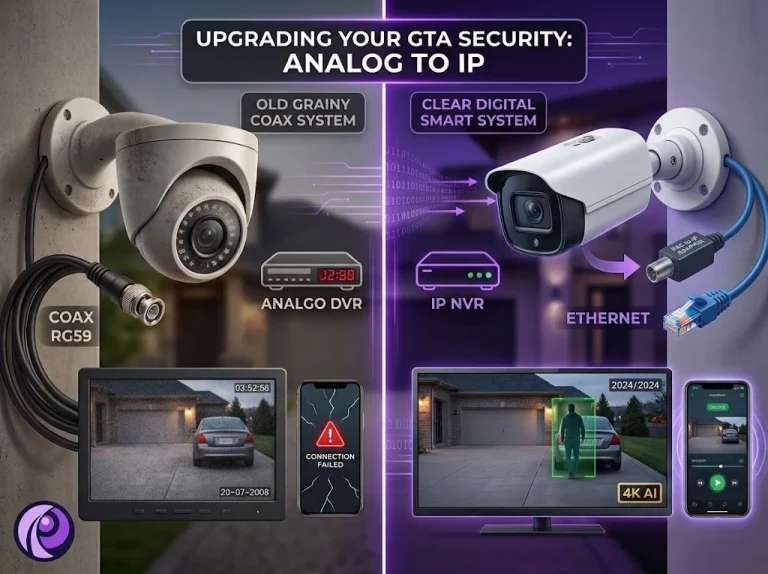
Most analog systems in the GTA were installed ten or fifteen years ago, and the footage shows it: grainy faces, unreadable plates, and a recorder that will not talk to a modern phone app. When owners start looking at an upgrade, the first question is usually a practical one. Can I use IP cameras with my DVR, or does the whole system have to go? And what about the coax already running through the walls?
Can I Use IP Cameras With a DVR?
Not with a standard analog DVR. The two kinds of recorder handle video in different places. An analog camera sends a raw video signal down the coax and the DVR does the work of turning it into digital footage. An IP camera does that work itself and sends compressed video over a network cable, which is exactly what an NVR (network video recorder) is built to receive. A DVR with only BNC inputs on the back has nowhere to plug an IP camera in and no software to decode its stream. To find out what you have, read the model number on the recorder’s label and look up its datasheet. The line that matters is usually called “IP video input”. If it is missing or reads zero, the DVR is analog only.
Hybrid DVRs for IP Cameras
Many HD over coax recorders sold in the past several years are hybrids. Hikvision calls its line Turbo HD, and Dahua sells XVRs (often marketed as Penta-brid). These accept analog and HD over coax cameras on their BNC inputs, plus a small number of IP cameras over the network port. The limits are what catch people out:
- Few IP channels. Many hybrids add only two to eight IP cameras on top of their analog inputs.
- Trading channels. Some models only reach their full IP count when you switch analog channels off. One current 4-channel Turbo HD DVR, for example, can run up to six IP cameras, but only with every analog input disabled.
- Resolution caps. IP channels often have a maximum resolution below what modern IP cameras can produce.
- No PoE ports. Hybrid DVRs rarely power IP cameras, so you need a separate PoE switch.
A hybrid works well for adding one or two IP cameras where coax never reached, such as a new garage or a rear lane. It is not a way to convert a whole system.
Analog to IP Camera Upgrade: Three Paths
People often call this an analog to digital CCTV conversion, although any DVR is already recording digitally. What owners really mean is moving to higher resolution cameras, better night images and reliable phone access. There are three ways to get there, and the right one depends on what you want to reuse.
| Path | What you keep | What changes | Best when |
|---|---|---|---|
| 1. HD over coax | Coax runs, sometimes the camera positions | New HD analog cameras (HD-TVI or HD-CVI) and a matching DVR | Walls are finished, the coax is in good shape and you do not need IP features |
| 2. Hybrid | Existing analog cameras and coax | A hybrid DVR, plus new Cat6 for the IP cameras you add | Most cameras are fine and you only need a few new positions |
| 3. Full IP | Camera positions, and the coax if you use adapters | An NVR, IP cameras, and either Ethernet over coax adapters or new Cat6 | You want the best image, AI detection and a system that will last |
HD over coax has improved a great deal. Current HD-TVI and HD-CVI cameras reach 4K, and Dahua rates its 4 MP and 8 MP HD-CVI signal for runs of up to 300 metres on quality coax. Full IP still offers more, including higher resolutions, on-camera analytics, simpler expansion and a much wider choice of cameras, which is why most long-term upgrades end up there.
Can You Use Existing Coax for IP Cameras?
Yes, but not on its own. An IP camera needs an Ethernet connection, and coax is not an Ethernet cable. To bridge the gap you add a small adapter at each end of the run. This approach, called Ethernet over coax (EoC), lets you hang an IP camera on cable that used to carry analog video.
How Ethernet Over Coax Works for Cameras
One adapter sits next to the camera and connects to it with a short network patch cable. The other sits at the recorder end and plugs into the NVR or a PoE switch. The coax runs between the two. Here is what to expect from that setup:
- Power can travel too. Many adapters pass PoE power through the coax, so the camera needs no separate power supply. Not every model does, so check before you buy.
- Speed is limited but usually enough. Most adapters run at 10/100 Mbps rather than gigabit, which comfortably handles a single camera stream.
- Distance is a strength. A network cable tops out at 100 metres, while EoC can carry IP video over runs of more than 1,000 feet (about 300 metres). That makes it useful for long runs to gates, outbuildings and parking areas.
- Usually one camera per cable. Each run needs its own pair of adapters unless you use multi-port units at the recorder end.
When to Reuse Coax and When to Pull Cat6
Adapters add hardware cost to every camera, so EoC is not automatically the cheaper option. It wins when pulling new cable would be disruptive or impossible, and loses when an open basement ceiling or an accessible attic makes new Cat6 straightforward.
| Reuse the coax (EoC) when | Pull new Cat6 when |
|---|---|
| Walls and ceilings are finished and hard to open | Cable paths are open or easy to fish through |
| Runs are longer than 100 metres | Runs are under 100 metres |
| The coax tests clean, with few splices and solid connectors | The coax is old, spliced, water damaged or of unknown quality |
| You are upgrading a handful of cameras | You are upgrading most or all of the system at once |
Whichever way you lean, test the existing coax before committing. Old runs often hide splices, corroded connectors or “Siamese” cable (coax bundled with a power pair), and any of those can cause intermittent dropouts after the upgrade.
DVR to NVR Upgrade: When to Replace the Recorder
Swapping the DVR for an NVR is the step that turns a system into a true IP system. It is worth doing when the recorder itself has become the bottleneck, which usually shows up in one of these ways:
- The DVR is analog only, or limited to old resolutions such as 960H, so better cameras would be wasted on it.
- It no longer receives firmware updates, or its phone app has stopped working.
- It lacks modern compression such as H.265, so storage fills quickly and retention is short.
- You want person and vehicle detection to cut down false alerts.
- The hard drive is failing and the unit is old enough that repairing it makes little sense.
One point often gets missed: recordings on the old DVR do not move to the new NVR. The drive format is different, so the footage stays where it is. Export any clips you need first, or leave the old DVR running on its own until its footage is no longer needed.
Planning a Security Camera System Upgrade
A CCTV system upgrade goes smoothly when the decisions are made in the right order. Working through these steps before you buy anything avoids the most common mistakes, like a recorder with too few channels or cameras that cannot reach the switch.
- Inventory what you have. List every camera position, the recorder model and the cable type at each camera: RG59 coax, Siamese cable or Cat5e/Cat6.
- Decide which positions matter. Upgrade entrances, driveways and cash areas first. Low-value positions can wait or be dropped.
- Choose the path for each run. HD over coax, EoC or new Cat6. A mixed approach is normal.
- Size the recorder with headroom. Pick an NVR with more channels than you need today and enough PoE ports or a PoE switch with a sufficient power budget.
- Plan storage and retention. Higher resolution cameras need more space. Decide how many days of footage you want to keep, then size the drives to match.
- Secure remote access from day one. Use unique passwords and the manufacturer’s app or a VPN rather than opening the recorder to the internet.
- Export old footage before the swap. Save anything you may need from the old DVR, then decommission it.
Getting a Clear Upgrade Plan
Most upgrades come down to a short site visit: we identify the recorder, test the existing coax, and tell you which runs can be reused and which are worth replacing. Whether you are adding two IP cameras to a hybrid DVR or moving a whole property to IP, our security camera installation team can plan it in stages so the cameras keep recording throughout. Call us to book an assessment anywhere in the GTA.