It is the first question almost every property owner asks before booking a security camera installation in Toronto, and the honest answer is that neither option is universally better. Wired and wireless cameras solve different problems, and the right pick depends on the property, the budget, and how the system will actually be used day to day. This guide breaks down the real differences, then gives a separate recommendation for Toronto businesses and Toronto homes, since the two rarely land on the same answer.
Wired vs Wireless: The Core Difference
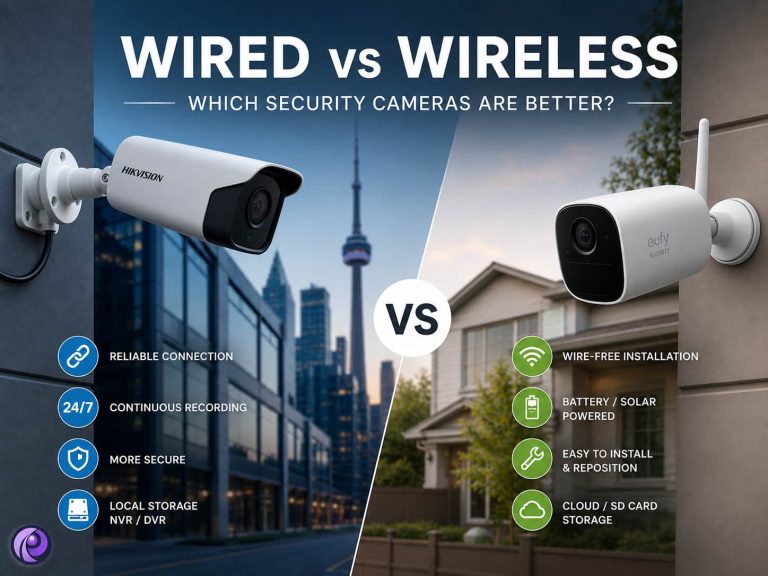
The terms describe two separate things: how the camera sends its video, and how the camera gets its power. A wired camera sends video over a physical cable, usually Ethernet with Power over Ethernet (PoE), so one cable carries both the signal and the electricity to run the camera. A wireless camera sends video over Wi-Fi instead, but it still needs power from somewhere, either a nearby outlet or a rechargeable battery. Cameras that need neither a video cable nor a power cable are properly called wire-free, which is a subset of wireless.
| Aspect | Wired | Wireless |
| Video transmission | Physical cable (Ethernet or coax) | Wi-Fi |
| Power source | Same cable (PoE) or a dedicated power line | Battery, solar, or a plug-in adapter |
| Typical recording | Continuous, stored on a local NVR or DVR | Often motion-triggered, stored on microSD or cloud |
| Installation | Professional, cable runs through walls or conduit | DIY-friendly, little to no drilling |
| Best property type | Permanent, multi-camera coverage | Rentals, temporary setups, hard-to-wire spots |
Wired Security Cameras: Strengths and Trade-offs
- Reliable, continuous video with no dependence on Wi-Fi signal strength
- Records around the clock without battery limits, since power comes through the cable
- Harder to disrupt remotely, since there is no wireless signal to jam or intercept
- Scales cleanly to eight, sixteen, or more cameras on one local NVR
- Trade-off: installation takes longer and usually needs a professional to run cable cleanly
- Trade-off: repositioning a camera after installation means moving the cable too
Wired systems are the default choice whenever a property can tolerate a proper installation, since the ongoing reliability and low maintenance pay for the upfront labour within a year or two.
Wireless Security Cameras: Strengths and Trade-offs
- Fast to install, often without any drilling or professional labour
- Easy to reposition or take along when moving out of a rental
- Good fit for a detached structure or fence line where running a cable is impractical
- Trade-off: video quality and reliability depend on Wi-Fi signal strength and network load
- Trade-off: battery-powered units usually record only on motion, not continuously, and need periodic charging
- Trade-off: a Wi-Fi outage or a dead battery leaves a gap in coverage
Wireless cameras earn their popularity through convenience, not through outperforming wired systems on raw reliability. They are the right tool for a specific gap, not a full replacement for a planned system.
Wired vs Wireless: Side-by-Side Comparison
| Factor | Wired | Wireless |
| Reliability | High, unaffected by Wi-Fi | Depends on signal strength |
| Continuous recording | Yes, standard | Usually motion-triggered only |
| Installation effort | Higher, professional recommended | Low, DIY-friendly |
| Long-term cost | Lower per camera at scale | Higher with multiple battery units |
| Security against hacking | Stronger, no wireless signal to target | Good with strong passwords, still network-dependent |
| Flexibility to relocate | Low once installed | High |
Best Choice for Toronto Businesses
For most commercial properties across the GTA, a wired commercial security camera installation is the stronger choice, and not just for picture quality. Insurance providers and liability claims typically expect continuous, timestamped footage rather than motion clips with gaps between them, and a wired NVR system delivers that without relying on Wi-Fi. Retail stores, restaurants, and warehouses also tend to have multiple entry and exit points that need simultaneous coverage, which is exactly where a local NVR running Hikvision or Dahua hardware scales more cleanly than a collection of separate wireless units. Toronto’s winter storms add another practical factor: a building-wide power outage can take a Wi-Fi router down with it, and a wired system on a small UPS keeps recording through the outage, while battery cameras simply run on whatever charge they had left.
| When wireless still makes sense for a business
A satellite location, a construction trailer, or a seasonal pop-up that will not be in the same spot for more than a few months is a reasonable exception, since the property will not be around long enough to justify a cable run. |
Best Choice for Toronto Homes
Most homes do best with a hybrid setup rather than picking one side completely. A wired residential security camera installation covering the front door, driveway, and main entry points gives continuous recording exactly where it matters most, while a wireless camera fills in a detached garage, a shed, or a side gate where running a cable would mean opening up finished walls. Toronto winters are the local factor that tips this decision: lithium batteries lose a meaningful share of their capacity in sub-zero temperatures, so a wireless camera that lasts months in summer can need recharging every few weeks once January hits, and a Wi-Fi router knocked out by an ice storm takes every wireless camera on the property offline at the same time it matters most.
| When wireless works well for a home
A condo unit, a rental property, or a small detached structure where drilling is not an option or not worth the effort is a good fit for a battery or solar camera, especially when it is one of two or three cameras rather than the entire system. |
Quick Decision Guide
- Choose wired if the property is permanent, needs continuous recording, or has more than three or four cameras
- Choose wireless if the spot is temporary, hard to run a cable to, or you are renting rather than owning
- Choose a hybrid setup if some areas need guaranteed continuous coverage and others just need a flexible extra angle
Not sure which mix fits your property? Our technicians can walk the site and recommend wired, wireless, or a hybrid plan. Request a free quote and we will respond within 24 hours with a written, fixed-price recommendation.