What Is Apple HomeKit?
Apple HomeKit is the framework Apple uses to connect and control smart home accessories, including lights, locks, thermostats, sensors, and security cameras, through the Home app on iPhone, iPad, Mac, and Apple Watch. It is also the platform behind Siri voice commands such as “Hey Siri, show me the backyard camera.” When an accessory carries the “Works with Apple Home” badge, it means the device has passed Apple’s certification process and can be added to the Home app directly, without relying on a third-party bridge.
Security cameras occupy a more specialized tier within HomeKit. Many cameras support basic HomeKit pairing for live viewing and notifications, but a smaller group of cameras also support HomeKit Secure Video (HKSV), an Apple-specific feature that analyzes motion clips on-device, encrypts them end-to-end, and stores them in iCloud rather than on a manufacturer’s server. HKSV requires an iCloud+ subscription and an always-on home hub, such as an Apple TV, HomePod, or HomePod mini, to process and relay footage.
Researching Security Cameras in Toronto or the GTA?
If you are in the process of selecting a camera system for your home or business and based in Toronto, Mississauga, North York, Markham, Brampton, or the surrounding area, our team offers a
free consultation with no obligation. We help you choose the right camera type, placement, wiring, and storage setup, whether or not Apple HomeKit integration is part of your plan. Learn more about our security camera installation.
Why Connect Your Security Cameras to Apple HomeKit?
Linking a security camera to HomeKit adds a layer of privacy and convenience that most manufacturer apps cannot match on their own. The benefits go well beyond simply seeing the same feed in a different app.
- Voice access: Ask “Hey Siri, show me the driveway” and the live feed appears instantly on an iPhone, iPad, or Apple TV connected to your home.
- Stronger privacy: HomeKit Secure Video processes face, person, pet, and vehicle detection directly on your home hub instead of sending raw footage to a manufacturer’s cloud for analysis.
- End-to-end encryption: Recorded clips stored through HKSV are encrypted so that not even Apple can view them, which is a meaningfully different privacy posture than most vendor cloud plans.
- One control centre: Cameras from different certified brands can sit in the same Home app alongside your lights, locks, and sensors, rather than juggling several separate apps.
- Smart automations: Trigger scenes such as unlocking the smart lock when a recognized face is detected at the door, or turning on porch lights when motion is detected after sunset.
An Important Distinction Before You Buy
Not all HomeKit-labeled cameras offer the same level of integration. A small group of cameras, including the ones recommended below, are natively certified for HomeKit Secure Video, meaning the live feed, motion history, and facial recognition all live inside the Home app with encrypted iCloud storage. A separate, much larger group of popular cameras (Ring, most Wyze models, and most eufy models, for example) are not officially HomeKit compatible at all; any HomeKit functionality for those brands depends on unofficial, self-hosted bridges such as Homebridge or Scrypted, which Apple does not support or guarantee will keep working after a firmware update.
This is an important distinction because it affects reliability. If a stable, officially supported HomeKit connection is the priority, the cameras below are genuinely certified by Apple, not added through a workaround. If you already own a camera from a brand not on this list, it is worth confirming on Apple’s own accessory directory before assuming a community bridge will work long-term.
The Best Security Cameras That Work With Apple HomeKit
The list below covers natively certified HomeKit cameras across indoor, outdoor, and doorbell use cases, including both HomeKit Secure Video models and a local-storage alternative for households that prefer to skip the iCloud+ subscription.
1. Logitech Circle View
Best for: The most polished all-around HomeKit Secure Video experience.
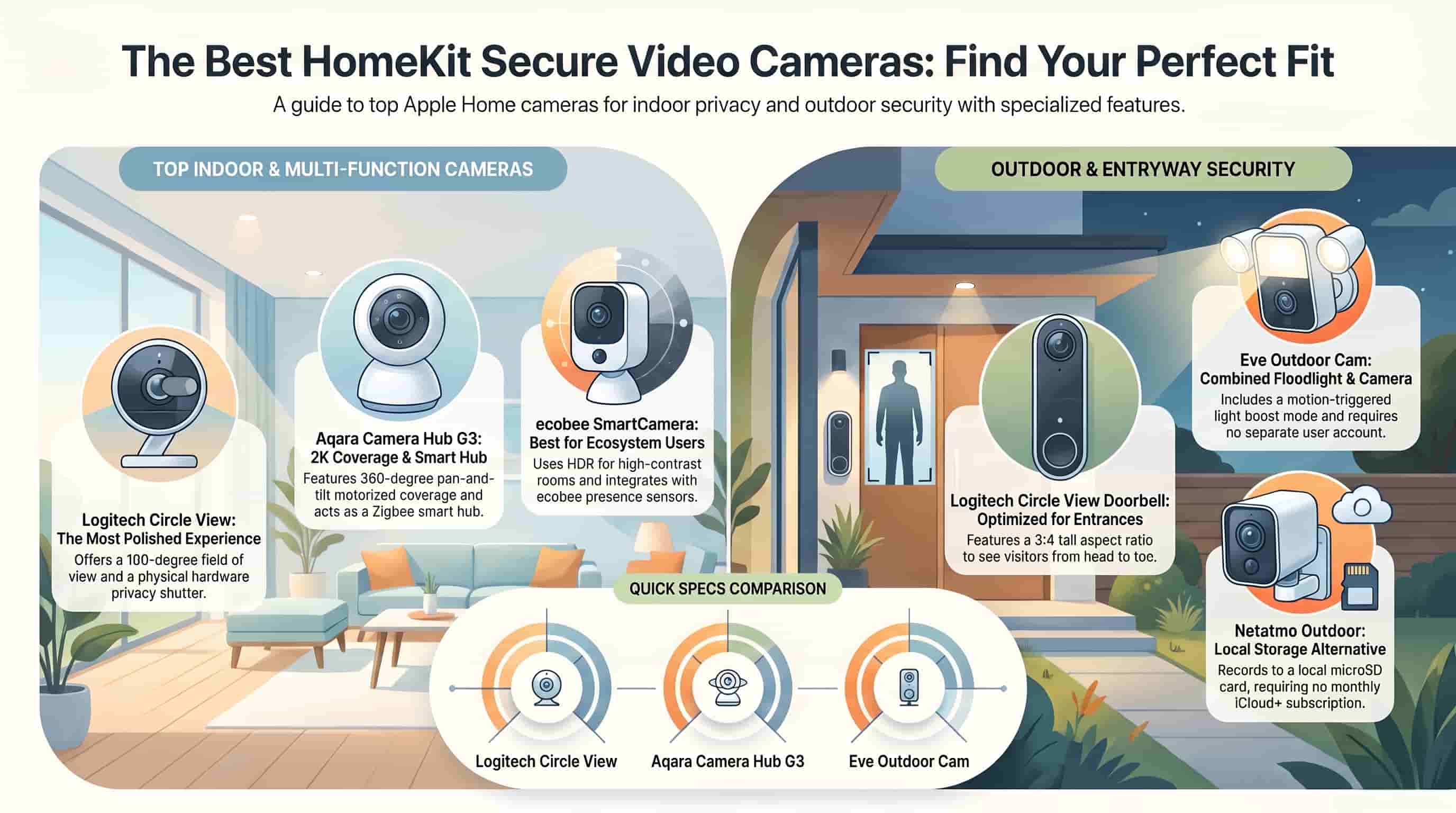
The Circle View was built specifically for Apple users and connects directly to the Home app without requiring a separate Logitech account or app at all, a rare setup among smart cameras. It records 1080p HD video with a wide 180-degree field of view, suiting both indoor rooms and covered outdoor entryways, and includes a physical privacy shutter so the lens can be mechanically blocked when the camera is not in use.
- 1080p HD resolution with a 180-degree diagonal field of view
- Native HomeKit Secure Video support; no Logitech account required
- Hardware privacy shutter for physical lens coverage
- IP64 weather resistance suitable for covered outdoor areas
Manufacturer Page: Logitech: Circle View Product Page
2. Eve Outdoor Cam
Best for: A combined floodlight and camera for entryways and driveways.
The Eve Outdoor Cam bundles a wired floodlight with a 1080p HD camera into a single fixture, making it an efficient choice for a driveway or front entrance that needs both illumination and recording in one installation. A boost mode increases brightness automatically when motion is detected at night, and like the Circle View, it is a HomeKit Secure Video-native device with no separate Eve account requirement.
- 1080p HD video with a 157-degree field of view
- Built-in LED floodlight with an automatic night-time boost mode
- Native HomeKit Secure Video; works directly through the Home app
- Hardwired installation for continuous power, no battery to manage
Manufacturer Page: Eve: Outdoor Cam Product Page
3. ecobee SmartCamera
Best for: Households already using an ecobee thermostat and sensor system.
The ecobee SmartCamera is part of ecobee’s broader Haven home monitoring ecosystem, so it pairs particularly well with an existing ecobee thermostat and SmartSensors for presence-based automations. It records 1080p video with effective HDR for handling bright windows and shadowed rooms, and it supports HomeKit Secure Video for encrypted clip storage and facial recognition through the Home app.
- 1080p resolution with HDR processing for high-contrast rooms
- Native HomeKit Secure Video support
- Integrates with ecobee SmartSensors for presence-aware automations
- Indoor-focused design, well suited to living rooms and nurseries
Manufacturer Page: ecobee: SmartCamera Product Page
4. Aqara Camera Hub G3
Best for: Pan-and-tilt indoor coverage plus a built-in smart home hub.
The Camera Hub G3 doubles as both a 2K pan-and-tilt camera and a Zigbee hub for other Aqara sensors, locks, and switches, making it a practical anchor device for a household expanding its smart home setup. It supports HomeKit Secure Video natively, and its motorized base allows the camera to follow movement across a room rather than relying on a single fixed field of view.
- 2K QHD resolution with 360-degree pan and 100-degree tilt coverage
- Native HomeKit Secure Video certification
- Doubles as a Zigbee hub for other Aqara HomeKit accessories
- Local-only viewfinder mode available alongside HKSV for hybrid setups
Manufacturer Page: Aqara: Camera Hub G3 Product Page
5. Aqara G2H Pro
Best for: Budget-conscious buyers who still want certified HomeKit Secure Video.
The G2H Pro is one of the more affordable cameras with full HomeKit Secure Video certification, offering 1080p HD video, two-way audio, and human and motion detection without a significant price premium. Like the Camera Hub G3, it functions as a Zigbee hub, which gives it added value for anyone planning to add more Aqara sensors or accessories down the line.
- 1080p HD resolution with a 146-degree wide-angle field of view
- Native HomeKit Secure Video support at an entry-level price point
- Two-way audio with human and motion detection
- Built-in Zigbee hub for expanding an Aqara accessory ecosystem
Manufacturer Page: Aqara: G2H Pro Product Page
6. Netatmo Smart Outdoor Camera
Best for: Local storage with no iCloud+ subscription required.
The Netatmo Smart Outdoor Camera takes a different approach from the HomeKit Secure Video models above: it connects natively to the Home app for live viewing and notifications, but it records to a built-in local memory card rather than iCloud, so there is no recurring subscription needed for storage. It includes an integrated floodlight and uses on-device people, animal, and vehicle recognition.
- 1080p HD resolution with an integrated floodlight
- Native HomeKit live view and notifications, no HKSV subscription required
- Local recording to onboard memory, expandable with a microSD card
- IP65 weatherproof rating for permanent outdoor mounting
Manufacturer Page: Netatmo: Smart Outdoor Camera Product Page
7. Logitech Circle View Doorbell
Best for: Apple-native doorbell coverage with facial recognition.
The Circle View Doorbell extends the same Apple-first design as the standalone Circle View camera into a video doorbell, using a taller 3:4 aspect ratio that captures full-length views of visitors and packages on the doorstep. With HomeKit Secure Video, it can identify familiar faces by name in notifications, and it supports HomePods as wireless chimes in place of a traditional indoor doorbell unit.
- 1080p HD video with a tall 3:4 aspect ratio for full-body doorstep views
- Native HomeKit Secure Video with facial recognition naming
- HomePod and HomePod mini support as wireless chimes
- Hardwired installation using existing doorbell wiring
Manufacturer Page: Logitech: Circle View Doorbell Product Page
A Note for Toronto and GTA Buyers: Cold Weather Performance
HomeKit compatibility has nothing to do with how a camera survives a Canadian winter, but it is the one factor on this list genuinely worth adjusting for if the camera will sit outside in the GTA from December through February.
Why Cold Weather Affects Camera Choice
- Cold temperatures reduce the performance of internal electronics over time, and most manufacturers rate their outdoor units for a specific operating floor that a true Toronto cold snap can approach or exceed.
- Wired cameras avoid the battery-related cold weather issues that affect many wireless models, since there is no charge cycle that can stall out below freezing.
- Condensation from rapid indoor-to-outdoor temperature swings during installation can affect any camera, regardless of platform, if seals and ports are not properly closed after mounting.
How Each Camera on This List Handles a Toronto Winter
| Camera | Power Type | Rated Low Temp | Winter Suitability for the GTA |
| Logitech Circle View | Wired | -20°C (-4°F) | Good: continuous power, no battery to manage |
| Eve Outdoor Cam | Wired | -20°C (-4°F) | Good: continuous power, built-in floodlight aids visibility |
| ecobee SmartCamera | Wired (indoor) | indoor only | Not applicable: designed for indoor placement |
| Aqara Camera Hub G3 | Wired (indoor) | indoor only | Not applicable: designed for indoor placement |
| Aqara G2H Pro | Wired (indoor) | indoor only | Not applicable: designed for indoor placement |
| Netatmo Smart Outdoor Camera | Wired | -20°C (-4°F) | Good: continuous power, built-in floodlight aids visibility |
| Logitech Circle View Doorbell | Wired | -20°C (-4°F) | Good: powered by existing doorbell wiring, no battery concerns |
These figures come from each manufacturer’s published specifications. Real-world reports from Canadian users in online forums suggest performance can vary near the rated floor, so treat the numbers above as a guide rather than a guarantee during the coldest stretches of the year.
Our Recommendation for GTA Properties
Every outdoor-rated camera on this list is wired rather than battery-powered, which works in its favour for a Toronto winter: there is no battery to lose capacity or stop charging once temperatures drop below freezing. This is one advantage of the current HomeKit-certified outdoor camera lineup compared to the broader market, where many popular battery and solar cameras are not officially HomeKit compatible at all.
If running new wiring to an exterior wall, soffit, or detached structure feels impractical as a DIY project, that is exactly the kind of work a professional installation resolves cleanly. See our guide to Security Camera Installation for how we run clean, continuous power to locations a DIY setup usually cannot reach.
How to Add a Security Camera to Apple HomeKit
The setup process is largely consistent across certified HomeKit cameras, since Apple requires accessories to follow the same pairing standard to earn certification.
- Unbox the camera and confirm you have an active home hub (Apple TV, HomePod, HomePod mini, or an iPad that stays at home) if you intend to use HomeKit Secure Video.
- Open the Home app on your iPhone or iPad and tap the plus icon to add an accessory.
- Scan the HomeKit pairing code printed on the camera or its packaging, or hold your iPhone near the camera if it supports NFC pairing.
- Assign the camera to a room and, if applicable, enable HomeKit Secure Video recording within the camera’s settings in the Home app.
- Confirm an appropriate iCloud+ storage tier is active, then test a voice command such as “Hey Siri, show me the [camera name]” to confirm the